Free medicine tracker · No account · Works offline
Never wonder if you took your medicine.
MediMemo is a free medication tracker that shows today's doses at a glance. Tap once when you take a pill, see how consistent you've been, and keep everything on your own device. No account, no cloud.
- No account Nothing to sign up for
- 1 tap To log a dose
- Offline Works without internet
Try it: log today's doses
A pretend day with three medicines. Tap a dose to mark it taken, tap it again to undo, and watch your progress update. Nothing here is saved.
Today's doses
Tap a dose when you've taken it:
-
Atorvastatin
10mg • Morning, 08:30
-
Multivitamin
1 capsule • Afternoon, 13:00
-
Omega-3 Fish Oil
1000mg • Evening, 20:30
Your progress
Everything you need, nothing you don't
Built for the daily routine: quick to log, clear to read, and honest about how you're doing.
One tap to log
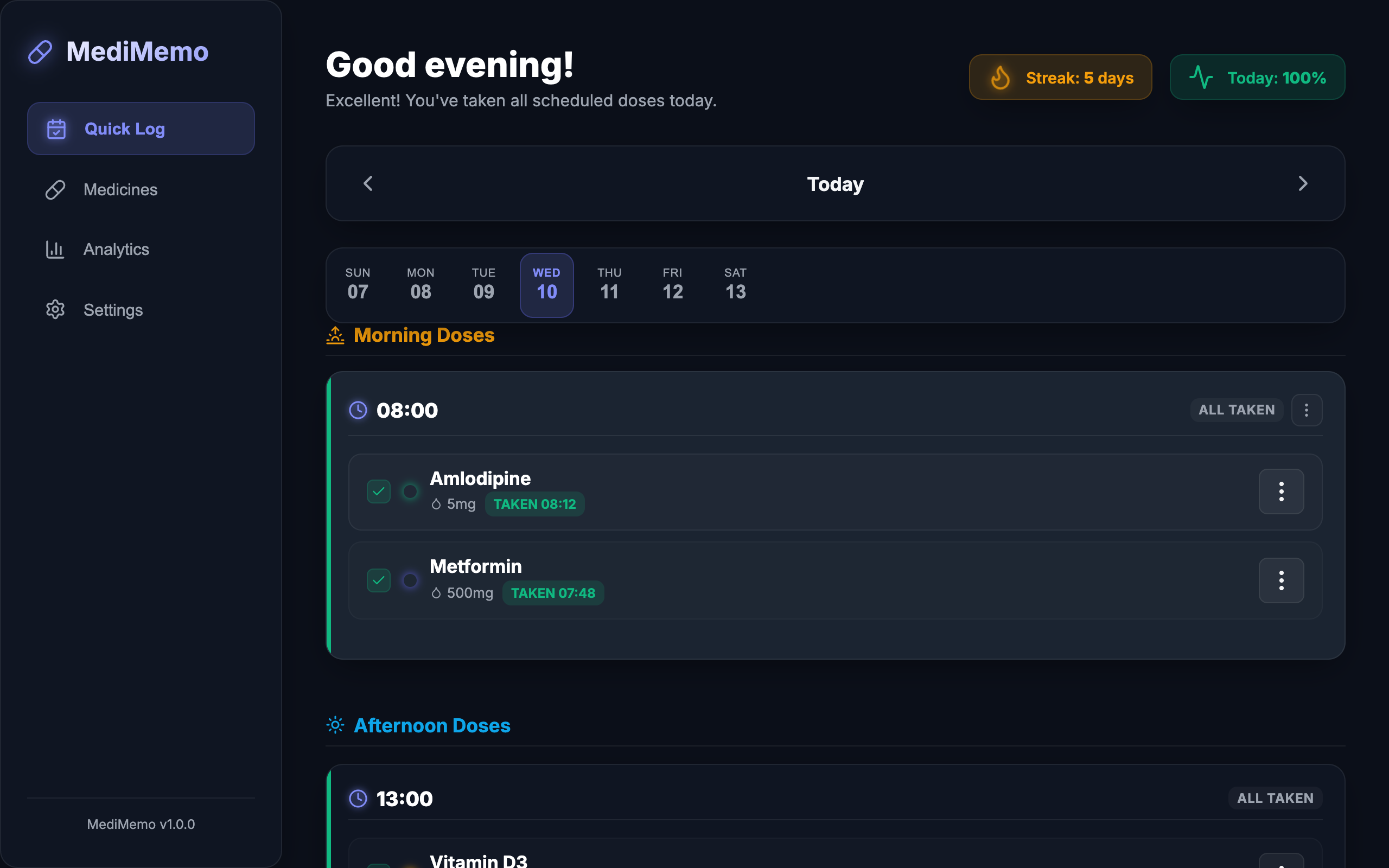
Tap once when you take a dose, or log a whole morning's pills together. Tapped by mistake? Undo it straight away.
Fits your schedule
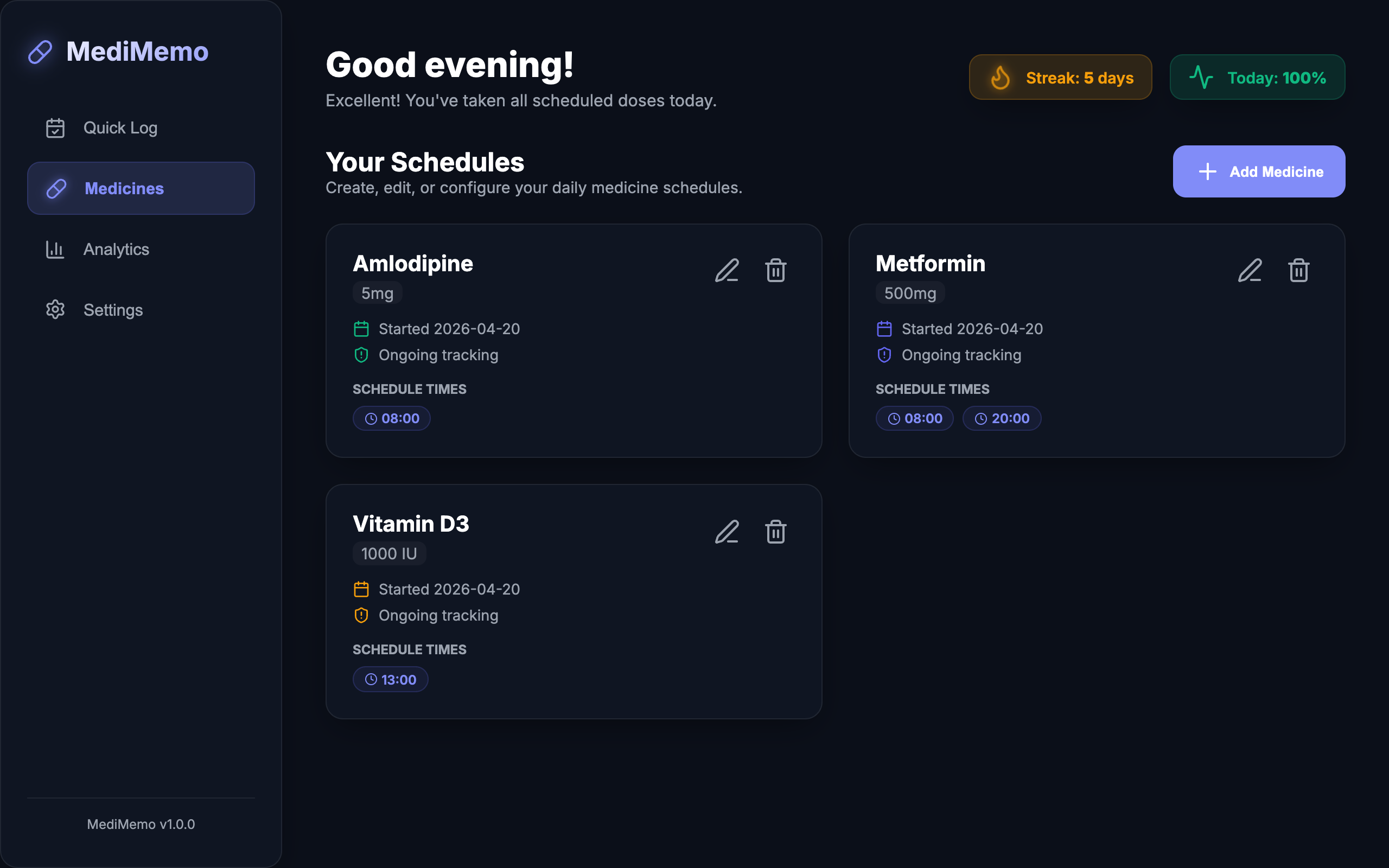
Every day, on chosen weekdays, every few days, or only as needed (PRN). Several times a day, and a tapering schedule for doses that step down over time.
Just what's due now
On your phone, the tracker shows the doses due around this time of day, so you're not scrolling past the whole day.
See how you're doing
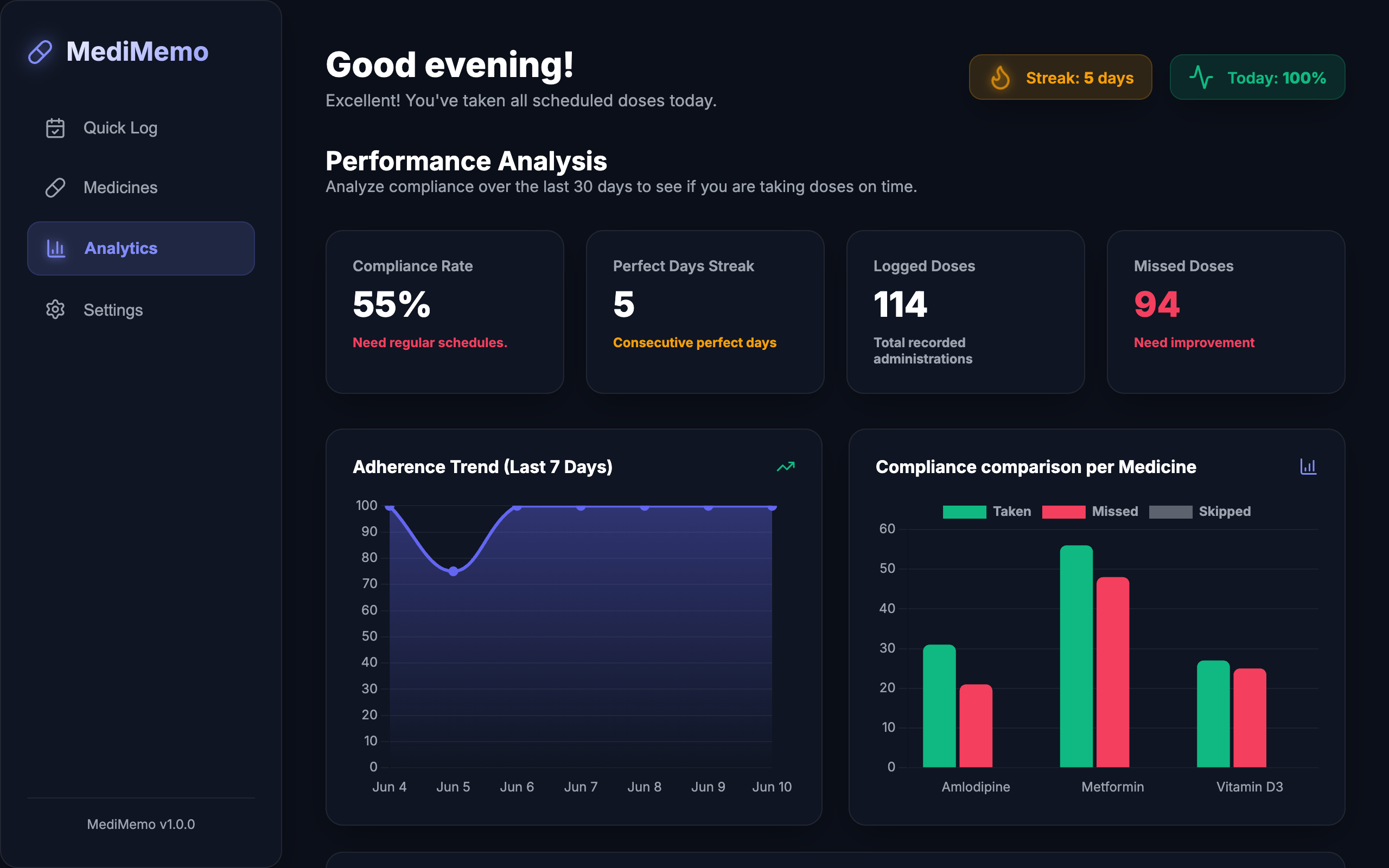
Charts show how many doses you took, how each medicine compares, and whether you tend to take some of them early or late.
A report for your doctor
Pick any date range and get a clear medication log to print, save as a PDF, or open as a spreadsheet (CSV).
Gentle reminders
Get a medication reminder shortly before a dose is due. Reminders are most reliable while the app is open.
See the real app
These are screenshots of MediMemo itself, not mock-ups: the daily tracker, the progress charts and your medicine list.
Our Privacy Promise
Your medicine list and history are personal. MediMemo keeps them on your device and nowhere else: there's no server to send them to, so we never see them.
No sign-up
No username, password or email. Open the app and start.
Stays on your device
Your data lives in this browser, on this device. Back it up to a file, with a password if you like.
No tracking or ads
No analytics, no ads, no tracking cookies. The app only loads its own files; it never sends your data anywhere.
Install it like an app
Add MediMemo to your home screen in a few taps. It then opens full-screen and works offline. No app store needed.
iPhone & iPad
Open the app in Safari, tap the Share button, then choose "Add to Home Screen".
Install before you start logging: the Home Screen app keeps its own data, separate from Safari. If you've already used MediMemo in Safari, export a backup there (Settings → Export) and import it in the installed app.
Android
Open the app in Chrome, tap the ⋮ menu, then "Install app" (or tap the install banner when it appears).
Reminders work best while the app is open. When it's closed, Chrome may deliver some of them, but not reliably.
Computer
In Chrome or Edge, click the install icon at the right end of the address bar (or menu → "Install MediMemo"). It opens in its own window.
Common questions
Straight answers about privacy, offline use and your data.
Is my data really private?
Yes. MediMemo never sends your data anywhere: there is no account, no cloud and no telemetry, and the app only ever loads its own files. Every medicine, dose and log lives only in your browser's storage on your device.
Does it work offline?
Completely. After your first visit the whole app is saved on your device, so it opens and works with no internet connection, including logging doses and viewing your progress. For the best experience, install it as an app.
How do I back up my data?
Open Settings → Backup & Restore in the app. You can export a plain backup file or a password-encrypted one (AES-256). The app also keeps automatic backups on your device that you can restore from Settings at any time.
What happens if I clear my browser data?
Because everything is stored on your device, clearing your browser's site data permanently deletes your MediMemo history. Export a backup first (Settings → Export) and import it again afterwards. Installing the app makes accidental clearing less likely. On iPhone and iPad it matters even more: Safari may delete a website's data after 7 days without a visit, while the Home Screen app is not affected.
What happens if I delete the installed app?
It depends on your device. On iPhone and iPad, the installed app keeps its own data, so deleting the icon from your Home Screen permanently deletes all your MediMemo data with it, and reinstalling starts empty. Always export a backup (Settings → Export) before removing the app. On Android with Chrome, your data generally stays in the browser after uninstalling, so reinstalling usually brings it back (other browsers may behave differently). On a computer with Chrome or Edge, the uninstall dialog has an "Also clear data" checkbox: leave it unticked to keep your data.
Does it sync between my phone and computer?
No, by design. Syncing would need a server and an account, which is exactly what MediMemo avoids. To move your history to another device, export a backup file and import it there.
Is MediMemo a pill reminder app?
MediMemo is first a medication tracker: it shows which doses are due and keeps a record of the ones you take. It can also remind you shortly before a dose is due. Reminders are most reliable while the app is open, so don't rely on them alone for a dose you must not miss.
Is MediMemo free?
Yes: free, with no ads, no subscriptions and no paid tier.
Short guides
How to get the most from a medication tracker that keeps everything on your device.
A medication tracker with no account
What you get, and what you give up, when an app needs no sign-up and has no cloud.
A medication log for your doctor
Turn what you've logged into a report to print, save as a PDF or open as a spreadsheet.
Tracking a tapering schedule
Set up a dose that steps down over time, and keep it as one medicine in your history.
Install MediMemo on your phone or computer
Step by step for iPhone, iPad, Android and desktop. No app store needed.
Back up and move your data
Where your data lives, how to export it, and how to take it to another device.
Who makes MediMemo
MediMemo is made and run by GRC Prisma. It is free, carries no ads, and we never see your data. Questions or problems? Write to medimemo@grcprisma.com. MediMemo is a personal tracking tool, not a medical device: read the medical disclaimer and the privacy policy.
Ready to start?
Open MediMemo in your browser and add your first medicine. It's free, needs no account and works offline.
Open the free appMediMemo is a personal tracking tool, not medical advice. Always follow your doctor or pharmacist.