What It Actually Looks Like
Real screenshots from the app — the daily tracker, your medicine schedules, and the analytics dashboard.
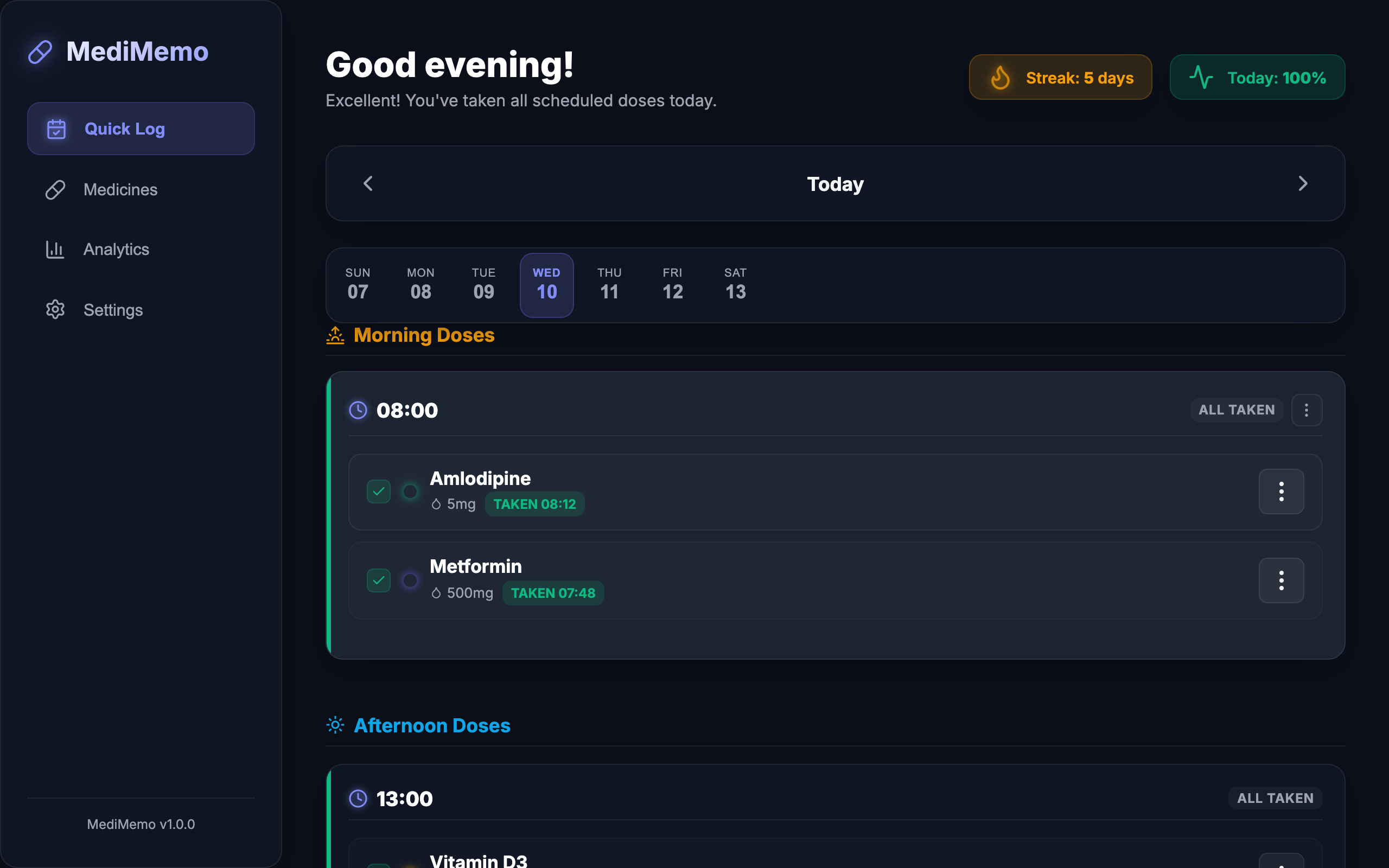
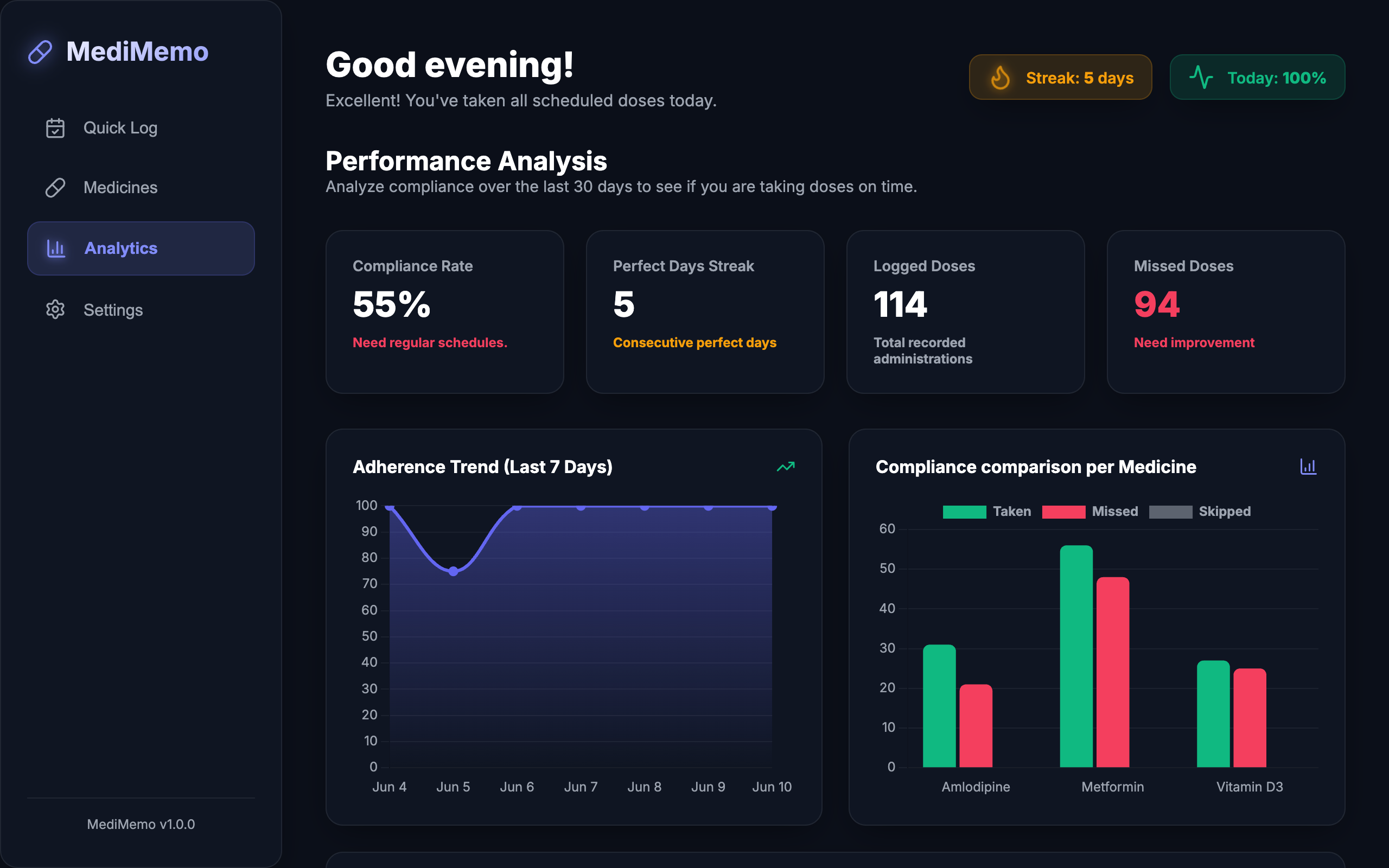
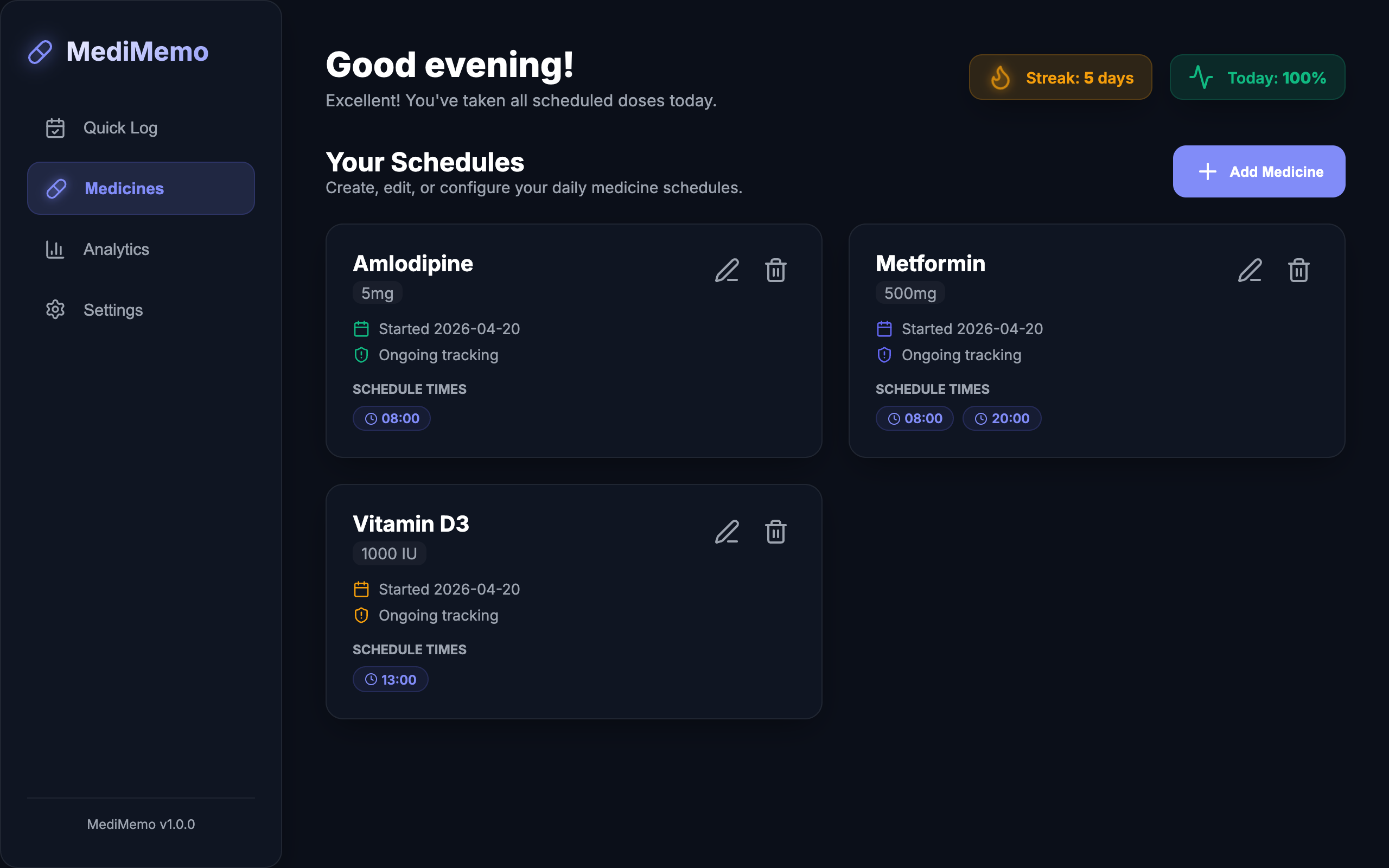
MediMemo is a premium, distraction-free medicine tracker and adherence analytics tool. Log scheduled doses in one tap, track timing trends — and keep every record on your own device.
Interact with the simulator widget below. Experience how 1-tap logging instantly updates your compliance metrics and analytical trends.
Tap the buttons below to log your simulated medications:
10mg • Morning (08:30)
1 Capsule • Afternoon (13:00)
1000mg • Evening (20:30)
Explore the core engine architecture crafted to deliver a flawless, high-precision tracking workflow.
No tracking cookies, no logins, no cloud scraping. All medicine schedules and dose histories are encrypted locally inside your device’s sandbox.
Design advanced recurring schedules. Customize dosages, color-accented categorizations, and build granular multi-time schedules instantly.
Our intelligent focus mode dynamically isolates and displays only the active scheduled slot based on the current time of day, cutting clutter.
Monitor overall compliance percentages, chronological logs, timing precision statistics, and deviation trackers to isolate missed intake patterns.
Logged multiple doses together by accident? Revert batch logs with a single tap using our automated time-sensitive undo and exclusion framework.
Fully optimized to run as a Progressive Web Application. Install MediMemo directly to your device desktop or mobile screen in a single tap.
MediMemo goes beyond standard checklist apps. It measures how many minutes late or early you take each dose on average, visually mapping your behavioral compliance trends day-over-day.
Real screenshots from the app — the daily tracker, your medicine schedules, and the analytics dashboard.
Health logs and prescriptions represent deeply personal data. Unlike traditional tracking utilities that require cloud subscriptions and database registrations, MediMemo is completely local-first. We operate on a zero-knowledge structure:
No usernames, passwords, or emails. Open the app and begin logging instantly with absolute anonymity.
Your medicine records are persisted solely within your local browser storage index. We never see them.
We do not run advertising systems, tracking scripts, or analytical trackers. Clean, private, and secure.
MediMemo is a Progressive Web App: install it once and it runs full-screen from your home screen or dock — fully offline, no app store needed.
Open the app in Safari, tap the Share button, then choose "Add to Home Screen". MediMemo appears as an icon and launches full-screen. Install before you start logging: the Home Screen app has its own storage, separate from Safari. If you've already used MediMemo in Safari, export a backup there (Settings → Export) and import it in the installed app.
Open the app in Chrome, tap the ⋮ menu, then "Install app" (or tap the install banner when it appears). Reminders work best while the app is open; when it's closed, Chrome may deliver some of them, but not reliably.
In Chrome or Edge, click the install icon at the right end of the address bar (or menu → "Install MediMemo"). It opens in its own window like any desktop app.
Straight answers about privacy, offline use, and your data.
Yes. MediMemo makes zero network requests — there is no server, no account, and no telemetry. Every medicine, dose, and log lives only in your browser's local storage on your device.
Completely. After your first visit, a Service Worker caches the whole app, so it loads and works with no internet connection at all — including logging doses and viewing analytics. For the best experience, install it as an app.
Open Settings → Data Management in the app. You can export a plain JSON backup or a password-encrypted backup (AES-256). The app also keeps an automatic local backup that you can restore from Settings at any time.
Because everything is stored locally, clearing your browser's site data permanently deletes your MediMemo history. Export a backup first (Settings → Export), and re-import it afterwards. Installing as a PWA makes accidental clearing less likely. On iPhone and iPad it matters even more: Safari may delete a website's data after 7 days of browsing without a visit, while the Home Screen app is not affected.
It depends on your platform. On iPhone and iPad, the installed app has its own isolated storage — deleting the icon from your Home Screen permanently deletes all your MediMemo data with it, and reinstalling starts empty. Always export a backup (Settings → Export) before removing the app. On Android with Chrome, your data generally stays in the browser after uninstalling, so reinstalling usually brings it back (other browsers may behave differently). On desktop Chrome or Edge, the uninstall dialog has an "Also clear data" checkbox — leave it unticked to keep your data.
No — by design. Syncing would require a server and an account, which is exactly what MediMemo avoids. To move your history to another device, export a backup file and import it there.
Yes — free, with no ads, no subscriptions, and no premium tier.
Launch the full Progressive Web App now in any modern browser. Zero configurations, absolute privacy, completely free.